Every first-person view, PS5 and Xbox
| View | PS5 | Xbox | Can you move? | How to leave |
|---|---|---|---|---|
| Stand-still look | Hold L2, press R3; R2 zooms | Hold LT, push in the right stick; RT zooms | No, only your head turns | R3 or the right stick again |
| Gun sight | Aim with L2, press R3 | Aim with LT, push in the right stick | Yes, you can strafe | Press it again or stop aiming |
| Touch pad glitch | Phone up, Circle, then tap the touch pad fast | Phone up, B, then tap View fast | Yes: walk, drive, shoot | Load a save |
How to look around in first person (L2 + R3)
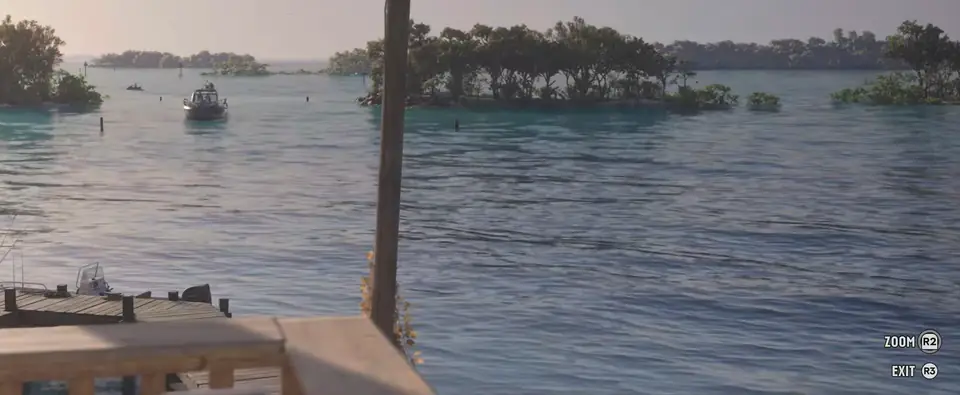
This view is part of the game. Use it to read a sign, check a shop shelf or watch an animal without walking up to it.
- Stand still.
- Hold L2 (LT on Xbox) and press R3 (push in the right stick on Xbox).
- Turn your head with the right stick. Your feet stay where they are.
- Press R2 (RT) to zoom in on something far away.
- Press R3 again to go back to the normal camera.
Some guides tell you to click both sticks. You only need the right one: while the view is open, the game itself shows ZOOM R2 and EXIT R3 in the corner of the screen.
How to aim in first person with a scope
A gun with a scope or sight on it can switch to a first-person aim. Buy one under the optics attachments at Ammu-Nation, then:
- Aim with L2 (LT) as usual.
- Press R3 (push in the right stick) to look down the sight. You can still strafe with the left stick.
- Press it again, or let go of L2, to drop back to the over-the-shoulder aim. Each new aim starts behind the shoulder again.
Is there a first-person car camera?
Not through any setting. The car cameras change how far back the view sits, and none of them is inside the car. In the settings, Touch Pad Button can be switched from Map to Camera; the game describes it as a way to toggle the camera view, and it does not add a driver's-seat view on its own. Players get one with the glitch below.
The other camera options, such as Camera Bob and Height (On Foot), are in our GTA 6 best settings guide.
The first-person glitch, step by step
Players found this after launch. It works on PS5 and Xbox, and the view it gives works on foot as well as in the car.
- Pause the game and open Settings, then the Controller tab. Scroll to DualSense Wireless Controller Features and set Touch Pad Button from Map to Camera. On Xbox, the same setting covers the View button.
- Sit in the driver's seat of any car.
- Take the phone out with Up on the d-pad.
- Put the phone away with Circle (B on Xbox) and, straight after, tap the touch pad (View on Xbox) again and again.
- If the camera jumps back behind the car, repeat steps 3 and 4. It often takes a few goes.
Once it catches, you see the dashboard and the mirrors from the seat. The view carries on away from the wheel as well: players walk, open the trunk, swap weapons and aim in it.
Two things to know first. The touch pad stops opening the map while the setting is on Camera, so open the map from the pause menu instead. And there is no button to turn the glitch off: load your last save to get the normal camera back, then set Touch Pad Button back to Map if you want the shortcut again. Saving before you try is cheap insurance; the GTA 6 saving guide shows where Save Game is.
First person and cheats
None of the 19 cheat codes out so far touches the camera, so a cheat will not give you first person. The full list is on the GTA 6 cheat codes page.
How we check this page
Each button here matches what the game shows on screen: the ZOOM and EXIT prompts in the stand-still view, and the Touch Pad Button wording on the settings screen. The glitch steps match two separate launch-week videos, and several guides agree on the rest. Last checked November 20, 2026.
Questions
Does GTA 6 have a first-person mode?
No. There is no first-person mode and no setting for one. You can still hold L2 and press R3 to look around through your character's eyes while standing still.
How do you go first person in GTA 6 on PS5?
Stop moving, then hold L2 and press R3. Press R2 to zoom and R3 again to go back.
How do you go first person in GTA 6 on Xbox?
Stop moving, then hold LT and push in the right stick. RT zooms in, and pushing in the right stick again puts the normal camera back.
Can you drive in first person in GTA 6?
Not with any camera setting. Players do it with a glitch: set Touch Pad Button to Camera, take the phone out in the driver's seat, then put it away and tap the touch pad fast.
How do you get out of first person in GTA 6?
From the stand-still view, press R3 or push in the right stick. From a scope, let go of L2 or LT. The glitch has no off button, so load a save.
Is there a first-person cheat in GTA 6?
None of the 19 cheat codes out so far changes the camera.
Did GTA 5 have first person?
Yes. GTA 5 added a first-person mode in its 2014 release for PS4 and Xbox One. GTA 6 launched without one.