Every setting worth changing, tab by tab
The Settings screen has 6 tabs worth a look: Controller, Gameplay, Display, UI, Camera, Audio. Under each option below you get the value it starts on, what to pick and what it changes.
Controller
- Aim Response Curve · starts on Standard · set: Linear. With Linear, the aim moves exactly as far as you push the right stick. Standard balances speed and precision.
- Look Acceleration and Aim Acceleration · starts on 7 · set: 8 or more. How fast the camera reaches full speed when you turn or aim. Raising it makes turning feel less sluggish.
- Deadzone (Left Stick) and Deadzone (Right Stick) · starts on 4 · set: Lower if your sticks are fine, higher if they drift. How far a stick has to move before the game reacts. A worn stick that drifts needs a higher number.
- Touch Pad Button (PS5) or View Button (Xbox) · starts on Map · set: Map, or Camera. Map opens the map with one press. Camera turns the button into a camera-distance switch instead.
- Adaptive Triggers Resistance and Adaptive Triggers Vibration · starts on On · set: Off if the triggers tire your fingers. PS5 only. The DualSense pushes back on L2 and R2 when you shoot or drive.
Gameplay
- Targeting · starts on Partial · set: Partial, or Free Aim. Lock-On grabs the nearest target. Partial pulls your aim toward a target without locking on. Free Aim gives no help at all.
- Aim Assist Strength · starts on 4 · set: 4. Slows the reticle down while it is over a target, so it is easier to stay on someone.
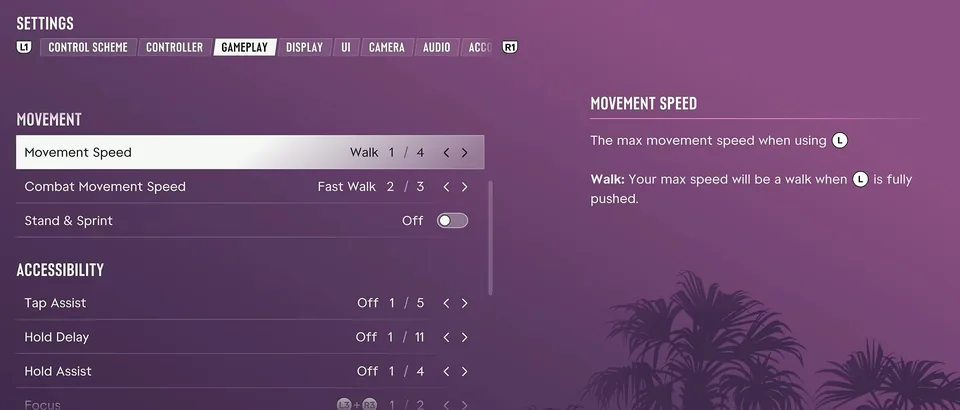
- Movement Speed · starts on Walk · set: Run. Sets your top speed with the left stick pushed all the way. On Run you run without pressing sprint, and easing off the stick still walks.
- Combat Movement Speed · starts on Fast Walk · set: Fast Walk, or Run. Your top speed during a fight. If Movement Speed is faster, that one wins.
- Stand & Sprint · starts on Off · set: Off. When on, sprinting from a crouch stands you straight up, which can give you away in a stealth mission.
- Tap Assist · set: 2x or Hold. For button-mashing moments. One press can count as 2, 3 or 4 presses, or you can hold the button instead.
- Simplified Mini Games · set: On if exercising or hotwiring is a struggle. Makes the inputs easier in moments like exercising, hotwiring a car and basketball.
- Auto Drive · starts on Restricted · set: Restricted. Drives you to your waypoint in the cinematic camera. Restricted only works where it is safe; Unrestricted keeps going even where you may crash.
- Auto Equip Helmet · set: On. Puts a helmet on when you get on a motorcycle or bike and takes it off when you get off.
- Accessible Combat and Reduced Vehicle Damage · starts on Off · set: On only if a mission keeps beating you. Accessible Combat lowers enemy health and the damage you take. Reduced Vehicle Damage makes your car tougher. The game warns that both change the balance a lot.
Display
- Brightness Calibration · starts on 15 · set: Up a few steps if nights look black. Raise it until the symbol on the test screen is barely visible.
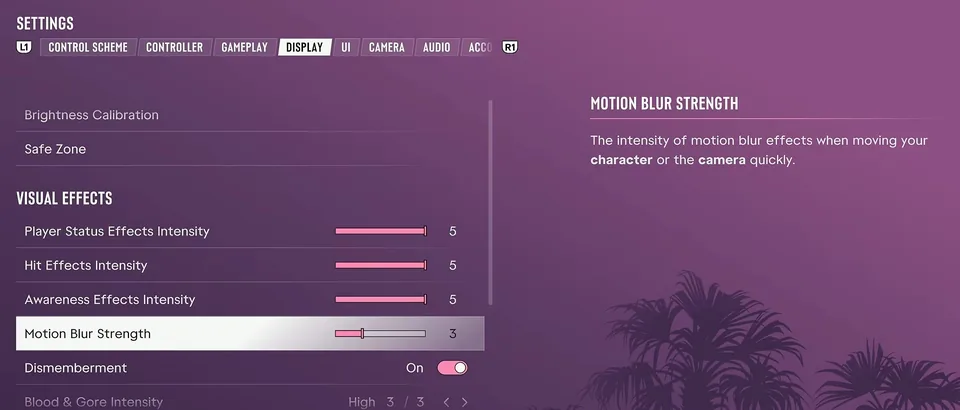
- Player Status, Hit and Awareness Effects Intensity · starts on 5 · set: 1 to 3. The red edges and filters for low health, being hit and nearby cops. Lower numbers keep the warning but clear up the screen.
- Motion Blur Strength · starts on 3 · set: 0. The smear when you or the camera move fast. At 0 the picture stays sharp when you turn.
UI
- Subtitles · set: Mission Only, or On. Mission Only shows subtitles for the lines that matter to the story. On also shows what people say in the street.
- Speaker Names · starts on Off · set: On. Puts the name of whoever is talking in front of each subtitle.
- UI Text Size · starts on Small · set: Medium on a TV across the room. The size of text, icons and button prompts.
- Map Blip Size, Minimap Blip Size and In-World Marker Size · starts on Default · set: Large. Bigger icons on the map, the minimap and the compass, and bigger markers in the world.
- Minimap · starts on Dynamic · set: Dynamic, or On. Dynamic brings the minimap up only when the game needs it or when you call it up. On keeps it on screen all the time.
- Door Markers · starts on On · set: On. Marks every door you can open. Worth keeping, since many doors look alike.
- Reticle Shape · starts on Complex · set: Dot, if you like a plain crosshair. How the crosshair looks. Dot leaves a single dot.
- Projectile Arc · starts on Off (Toggle On) · set: Always On. The line that shows where a grenade will land. By default you switch it on each time you aim a throw.
- Clock Format · starts on 12 Hour · set: Either. How the game shows the time.
Camera
- Height (On Foot) · set: High. How high the camera sits behind you on foot. High shows more of the street around you.
- Camera Shake · starts on On · set: Off. The shake when you run or crash a car.
- Camera Bob · starts on 10 · set: 0 to 5. How much the camera bobs as you walk, run or swim. Lower numbers help if the game makes you feel sick.
- Phone Display · starts on Default · set: Either. First Person shows the phone through your character's eyes when you take it out.
- Cinematic Vehicle Crash Frequency · starts on 3 · set: 1. How often a big crash cuts to a slow-motion shot.
Audio
- Controller Speaker · starts on On · set: Off. PS5 only. Plays the police scanner, phone calls, the GPS voice and some mini game sounds from the controller. It does nothing when headphones are plugged in.
- Tinnitus Reduction · starts on Off · set: On. Cuts the ringing sound after an explosion.
Does GTA 6 have a performance mode?
No. In its pre-load announcement, Rockstar said the game targets 30 frames per second on PS5 and Xbox Series X|S. There is no performance or quality switch on the Display tab, so lowering Motion Blur Strength and the camera shake is the way to make motion look cleaner.
The PS5 Pro runs the same frame rate with a sharper picture: ray-traced shadows and PlayStation Spectral Super Resolution (PSSR) upscaling. Those two features are not on the standard PS5.
PS5 and Xbox: what is different
- The Adaptive Triggers Resistance and Adaptive Triggers Vibration and the Controller Speaker options are on PS5 only.
- The map shortcut is the touch pad on PS5 and the View button on Xbox. Both sit under the same option.
- Rockstar says the DualSense haptics run through the whole game and can be turned down in the accessibility settings.
Playing in first person needs that map button too. The GTA 6 first-person guide shows the camera trick and how to undo it.
How we check this page
Option names, tabs and starting values are read off the Settings screens on PS5 and Xbox, and an option goes on this page only when at least two separate players show the same thing. The frame rate and PS5 Pro lines come from Rockstar. Last checked November 20, 2026.
Questions
What are the best settings for GTA 6?
Start with five: Movement Speed to Run, Motion Blur Strength from 3 to 0, Aim Response Curve to Linear, Camera Bob down from 10, and on PS5 Controller Speaker off. The rest depend on taste.
Does GTA 6 have a performance mode?
No. Rockstar built GTA 6 to target 30 frames per second on PS5 and Xbox Series X|S, and the Display tab has no performance or quality mode to switch. The PS5 Pro adds ray-traced shadows and PlayStation Spectral Super Resolution (PSSR) upscaling.
How do you turn off motion blur in GTA 6?
Pause, open Settings and go to the Display tab. Set Motion Blur Strength to 0; it starts on 3.
How do you run without holding a button in GTA 6?
Set Gameplay > Movement Speed to Run. It starts on Walk, so pushing the stick all the way only walks until you change it.
What is the best aim setting in GTA 6?
Leave Targeting on Partial and set Aim Response Curve to Linear. Move to Free Aim later if the pull toward targets gets in your way.
How do you stop sound coming from the PS5 controller in GTA 6?
Set Audio > Controller Speaker to Off. It carries the police scanner, phone calls and the GPS voice, and goes quiet anyway when headphones are plugged in.
Can you change what the touch pad does in GTA 6?
Yes. Controller > Touch Pad Button (PS5) or View Button (Xbox) switches between Map and Camera. It starts on Map.